Fashion Sketch to Video: Runway Animation with Dreamina
Every designer has a sketchbook full of looks that never made it past paper: a coat with an exaggerated collar, a gown that spills into a long train, a jacket built from patterns you couldn’t find in any shop. What if those figures could walk? With image to video, they can. Upload a sketch to Dreamina, let the Seedance 2.5 model do its work, and a flat drawing steps onto a catwalk. Below, you’ll see how to prep the sketch, write the prompt, and polish the clip. To try it yourself, start with this image prompt for a practice sketch:
Sketches carry what photos can’t
A fashion sketch isn’t trying to be realistic. It stretches the legs, exaggerates the neck, and plays up the one detail that makes the design feel alive. That energy is exactly what you want in motion. Instead of a stiff mannequin, you get a stylized figure with attitude. Sketch-based clips also feel more personal, which matters if you’re pitching a collection, teasing a launch, or building a following around your design voice. Plus, paper texture and brush marks give the video a handmade charm that photographed samples rarely match.
Prepping your sketch for the runway
A few quick checks make the animation cleaner:
- Draw the full figure, head to toe, with room around it
- Use clear outlines so edges are easy to follow
- Add flat color or light shading to show fabric and shape
- Keep the background plain white or a single soft color
- Scan or photograph in even light, without shadows
Messy pencil lines can work, but dark ink gives the model more to hold onto. A quick crop to remove stray margins also helps.
From sketch to runway with three Dreamina moves
Step 1: Upload your picture and write the prompt
Go to Dreamina, sign in, and go to the AI Video tab. Click “Upload reference image” to upload your sketch and write the prompt. Try this for 30 seconds: “Bring to life the uploaded fashion sketch in a 30-second runway video. Make sure to retain ink outlines, watercolor shading, and the emerald trench coat as depicted. The model walks down the long runway, taking confident strides, the coat moves with her strides, then stops, turns around and walks back in soft spotlights.”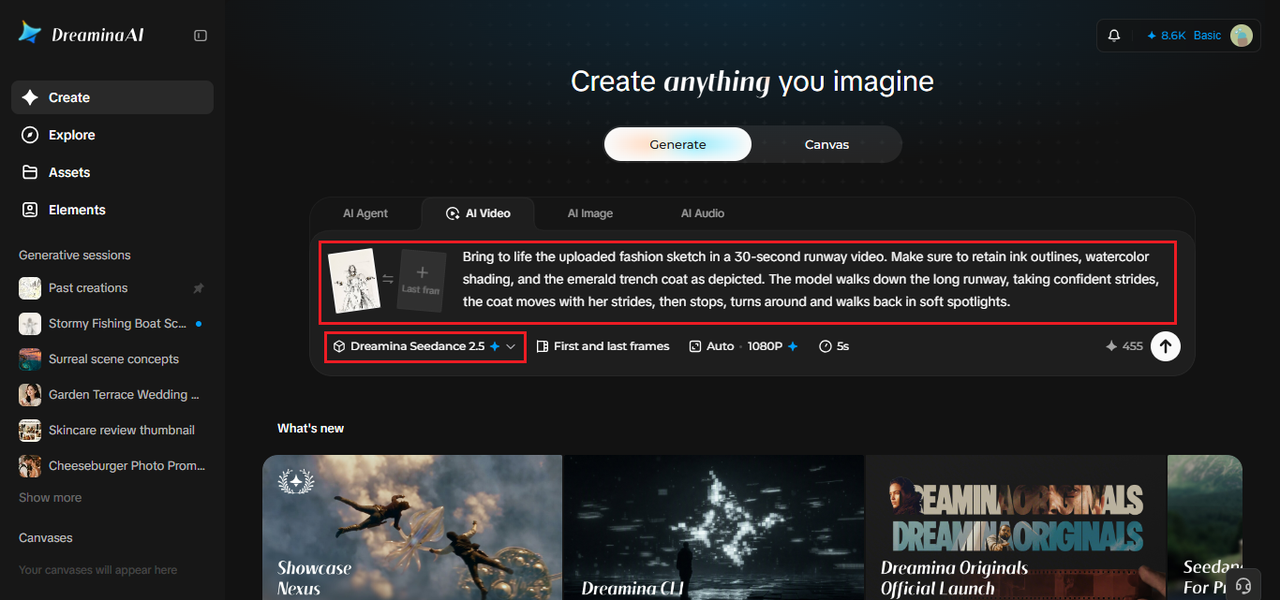
Step 2: Create your video
Choose the Seedance 2.5 model, set up the duration of the clip and select a 16:9 aspect ratio for YouTube or 9:16 for TikTok. Click the Dreamina logo, then wait for processing. A vertical frame works well for a solo figure.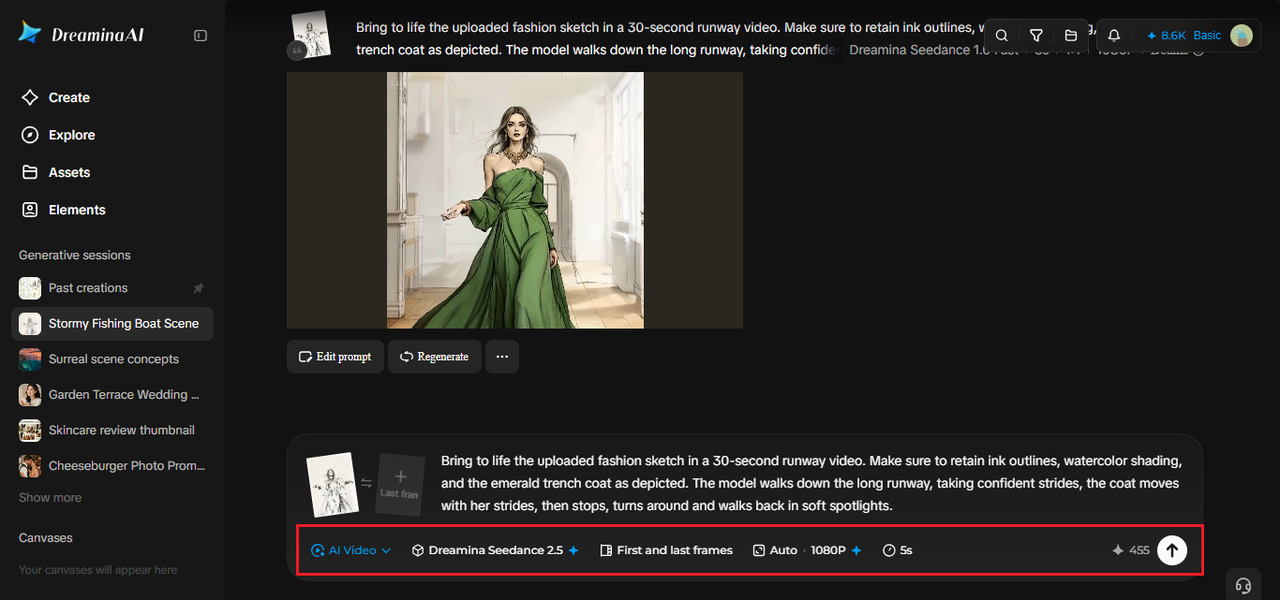
Step 3: Improve and download the result
Upscale sharpens the image, and Generate soundtrack adds a runway beat. Then export the video and share it. If the sketch lost some of its charm, rerun with a stronger line about keeping the original style.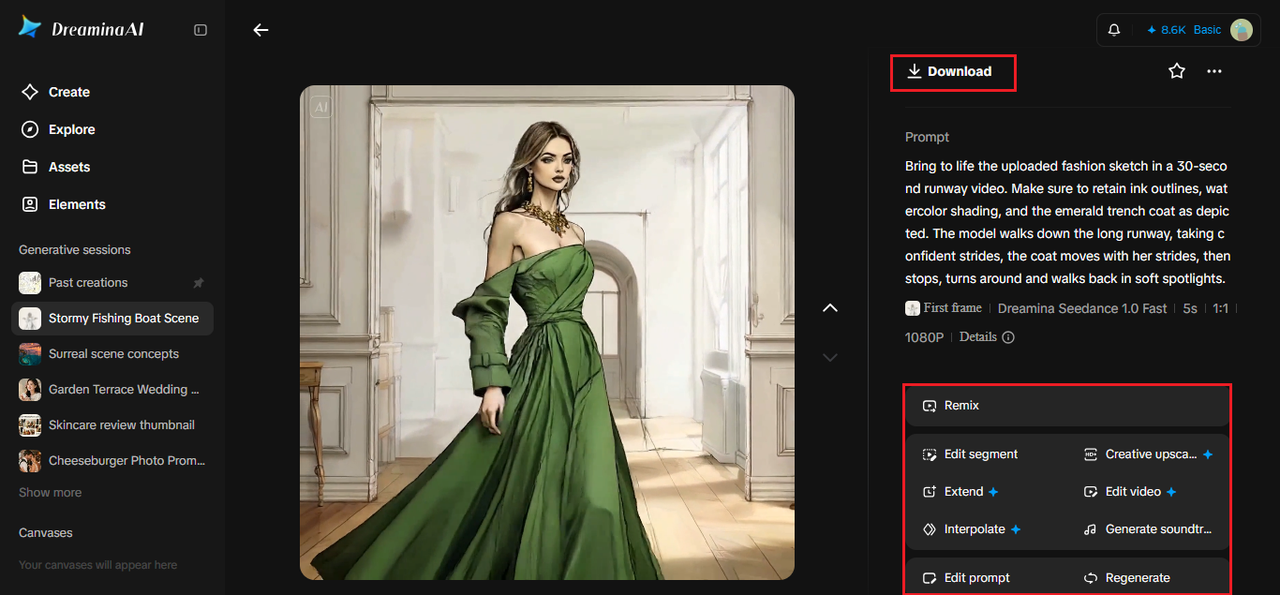
What Seedance 2.5 offers for fabric and movement
Clothing is tricky to animate, because fabric has to move with the body.
Reference footage that guides the walk
White model and wireframe-style references can steer the body movement, so the stride and turns look planned instead of random.
Style captured, not just motion
The model picks up emotion, shot language, and visual style from a reference, which helps preserve the sketchy, painted look of your drawing.
Quick fixes for accessories
Region-level editing means a stray pair of sunglasses or an unwanted bag can be removed without redoing the whole runway shot.
One brief with many inputs
Up to 50 pieces of material, including text, images, video, and audio, can go into a single generation, so a mood board and a runway soundtrack can sit beside your sketch.
Directing the walk
Runway walks follow a rhythm: stride forward, pause at the end, pivot, return. Put that rhythm into your prompt. Mention the pace, the pause, and the turn. Add a camera instruction, such as a steady front-facing shot or a slow side-tracking move. Avoid asking for dance moves or big gestures unless that’s your concept, since a confident, simple walk shows off the garment best. Rehearse the beat in your head first, and describe only what you’d see on the catwalk.
Describing fabric so it moves right
Different fabrics move differently, so name them. Silk flows, wool swings with weight, leather holds its shape and catches light, tulle floats. A phrase like “heavy wool coat swaying with each step” tells the model what to do with the hem. State any information you would like to highlight, like a contrasting collar and an asymmetrical hemline. Here is one more practice drawing for you to attempt.
Building a mini collection
Once one look works, repeat the process for the rest of your collection. Use the same prompt structure for each sketch, changing only the garment and fabric details, so the clips feel like part of a set. Stitch three to five together in any editor, add a soundtrack, and you’ve got a lookbook teaser that costs nothing but time. Keep the runway, lighting, and camera the same across clips for a consistent show.
Take your sketchbook to the runway
Your sketches already have style, and Dreamina gives them somewhere to walk. With Dreamina and Seedance 2.5, a flat drawing becomes a confident catwalk moment in minutes. Choose your favorite look, upload it, and see how it moves. The next runway show might start in your notebook.
Key Vocabulary
| Word | Meaning | Example |
|---|---|---|
| sketch (n.) | a quick drawing | She turned her sketch into a video. |
| garment (n.) | a piece of clothing | A simple walk shows off the garment best. |
| hemline (n.) | the bottom edge of a dress or coat | The coat has an asymmetrical hemline. |
| asymmetrical (adj.) | not the same on both sides | He likes asymmetrical collars. |
| stylized (adj.) | drawn in a special, not realistic style | The model looks stylized, not real. |
| stride (n.) | a long, confident step | The model walks with confident strides. |
| pivot (v.) | to turn quickly on one foot | She stops, pivots, and walks back. |
| retain (v.) | to keep | Retain the ink outlines in your prompt. |
| catwalk (n.) | the long stage in a fashion show | The sketch steps onto the catwalk. |
| lookbook (n.) | a set of photos or clips showing a collection | Make a lookbook teaser from five clips. |
Reading time: 5 minutes
Level: B2 (Upper-Intermediate)
IELTS: Band 5.5–6.5
TOEFL iBT: 60–78