How Classroom Management Tools Support a Better Learning Environment
The Contemporary Classroom
A phone buzzes. Three students start a side conversation. The lesson that was flowing five minutes ago has stalled, and now the teacher has two jobs at once: teaching the material and managing the room. Distractions pile up. Behavioral issues surface. Administrative work keeps growing quietly in the background. Add a room full of learners with different needs and attention spans, and staying on track becomes harder than it looks from outside the door.
Technology has earned a place in the classroom for exactly this reason. Modern classroom management software gives teachers a practical way to organize classroom activity and monitor it in real time, without turning every lesson into an exercise in discipline. No tool replaces a teacher’s judgment, nor can it replace the relationships built with students over a term. The best technology gives educators more room to use both.
This balance is even more important for language educators. Anyone who has spent years refining second language teaching methods knows that structure and engagement move together, since a wandering classroom rarely produces confident speakers. A lesson that stays on track frees up energy for what actually moves language learners forward. Conversation improves. Correction lands better. Practice gets more repetitions in the same fifty minutes.
What Are Classroom Management Tools?
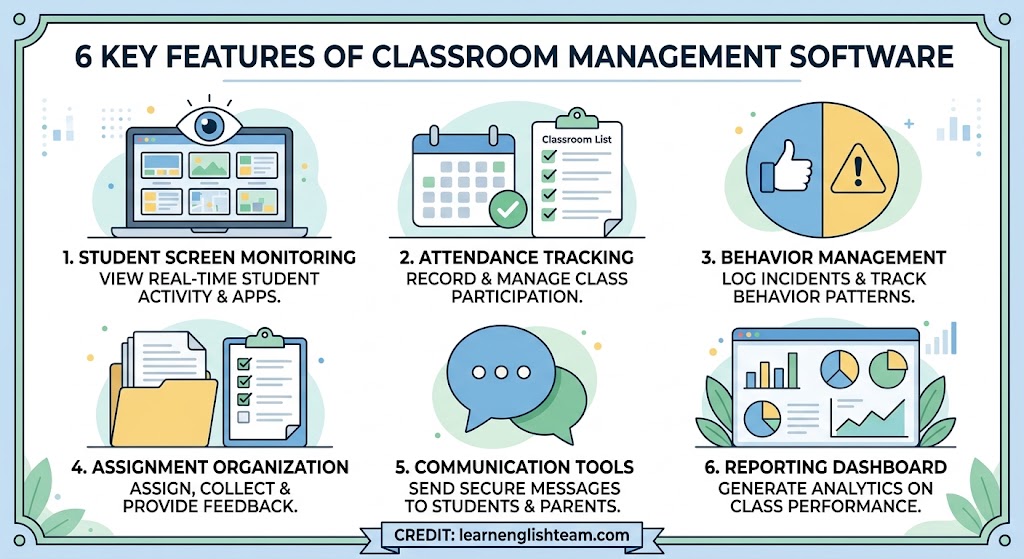
Classroom management software describes digital platforms built to help teachers organize and monitor what happens in class. It also gives them a way to guide student activity without stepping away from the lesson itself. Features vary by platform, but commonly include the following:
- Student activity and screen monitoring
- Attendance tracking
- Behavior management and incident logging
- Assignment and task organization
- Communication tools for students and parents
- Reporting and analytics dashboards
These tools are easy to confuse with a broader learning management system (LMS). An LMS centers on course content and grading, with curriculum delivery layered on top. Classroom management tools work differently: they track the day-to-day rhythm of the room, showing who is on task and who needs a nudge, updated in real time rather than at the end of a unit. Some schools run both side by side, with the LMS handling what students are learning, and the management platform handling how the room is functioning while that learning happens. Neither tool replaces the other, and most district technology plans now budget for both as separate line items.
The Role of Classroom Management in Student Learning
An organized classroom is, in a very direct sense, more teachable. When routines are predictable, students spend less mental energy guessing what happens next and more energy on the actual lesson. Predictability builds participation too. Students raise a hand more readily, and they take more risks with a new phrase or a spoken answer, in a room that already feels stable and fair.
Disruptions matter for the same reason. Every interruption resets the group’s attention, and some students need longer than others to refocus afterward. Students who struggle with transitions or sensory overload are disproportionately harmed by inconsistent structure, so strong classroom management, technology-assisted or not, tends to produce a more inclusive room. Over a full term, that consistency adds up. A class that spends less time resetting itself simply covers more material.
How Classroom Management Tools Improve the Learning Environment
Reduce Classroom Distractions
Digital tools can flag the moment a student drifts to an unrelated app or tab, and teachers can redirect attention without stopping the lesson to call anyone out in front of the class. That keeps device use on track and keeps the lesson’s pace intact. There are no repeated interruptions, only quiet course corrections along the way.
Improve Classroom Organization
Keeping schedules and student information in one place cuts the administrative shuffle down considerably, and task lists no longer live in three different notebooks. Routines that used to depend on memory or scattered paperwork become far easier to set up and maintain, freeing time that would otherwise disappear into repetitive logistics.
Encourage Student Engagement
Interactive activities and digital resources give students a clear, visible sense of what they should be doing at any given moment. Many platforms also help teachers catch disengagement early, since a student who has stopped interacting with the material stands out before the gap widens into something bigger. Those early signals are more important than most people realize; a brief check-in the moment a student tunes out works far better than trying to pull them back after ten minutes of drift.
Support Positive Behavior Management
Tracking behavioral patterns over time helps teachers notice trends as they form, before a single incident becomes a full pattern. That visibility supports more consistent expectations across the class and lets teachers step in early, addressing small issues before they turn into disciplinary ones.
Strengthen Teacher-Student Communication
Built-in messaging and notification features make feedback faster to deliver and instructions easier to follow. The same shift is playing out across education more broadly, and it connects to a wider story about how AI is changing the way students study as tools increasingly personalize feedback and flag where a student needs support before they fall behind.
Help Teachers Make Data-Informed Decisions
Dashboards and reports give teachers a clearer read on participation and activity trends across the whole class. That visibility helps identify which students need extra support, and it lets teachers adjust their approach based on patterns that actually show up in the data.
Benefits for Teachers and Students
For teachers, the payoff shows up in a lighter administrative load, more time for actual instruction, easier oversight of the room, and steadier enforcement of classroom expectations. Communication improves too, including with parents or administrators where that’s appropriate, mostly because it stops being so ad hoc.
Students benefit in parallel: clearer expectations, more structured routines, fewer distractions, and quicker access to feedback. Over time, this builds real accountability for participation, and it produces a more predictable, supportive experience; the kind of classroom students actually want to show up for.
Choosing the Right Classroom Management Tool
Not every platform fits every classroom. A tool built for a large lecture hall behaves differently in a small language classroom with pair work and speaking practice, so it helps to weigh options against a consistent set of criteria:
- Ease of use for both teachers and students
- Compatibility with existing devices and platforms
- Depth of monitoring and reporting capabilities
- Privacy and data security practices
- Accessibility features for diverse learners
- Scalability across classrooms or an entire school
- Integration with existing educational software
- Granular teacher and administrator controls
- Cost and licensing structure
Privacy deserves particular attention here. Any tool that monitors student activity also collects data about minors, and schools have a real responsibility to handle it properly. The U.S. Department of Education’s student privacy guidance lays out clear expectations for how educational technology should manage student data, which makes it a crucial starting point when vetting a new platform. Many schools also check their state education data privacy resources to confirm a given tool meets local requirements before it goes district-wide.
Best Practices for Using Classroom Management Technology
Getting real value from these tools starts before anyone switches them on. Schools should set clear policies in advance and explain the rules to students in plain language. Monitoring features work best when they’re used openly, since surprise monitoring tends to erode trust fast. The goal is transparent support: students know what’s being tracked and why.
Digital tools work alongside a teacher’s face-to-face judgment calls, and neither can cover both jobs equally. A quiet check-in with a struggling student still does things a dashboard alert can’t. Schools should periodically check whether a given tool is actually improving outcomes, and teachers need real training so the technology holds up well past a rocky first month.
Potential Challenges and Limitations
Every tool comes with trade-offs. Privacy and student data concerns are real, and they need ongoing attention well beyond a single policy review at rollout. Teachers face a learning curve with any new system, and technical issues, such as a dropped connection or a glitchy dashboard, can disrupt a lesson just as easily as the distractions the tool was meant to solve. A one-day training session rarely covers what a teacher needs three weeks in, once the novelty wears off and real classroom edge cases start showing up.
There’s also a risk of over-monitoring, where constant tracking starts to feel punitive to students, as well as a risk that the technology itself becomes a distraction. Budget and staffing constraints also limit what many schools can realistically deploy. The larger point is simple: classroom management stays human-centered, with technology playing a supporting role underneath it.
Creating a More Positive Learning Environment With Technology
The strongest results come from pairing classroom management tools with clear routines and consistent expectations. Add a proactive approach to behavior, and the pieces start reinforcing each other. Used well, these platforms give students real opportunities for independence and responsibility, and that’s a bigger win than tighter control alone. The focus stays on engagement and learning outcomes, and technology serves that goal without becoming the goal. A classroom that leans on these tools without losing its human center tends to feel calmer for everyone in it, teacher included.
Conclusion
Classroom management tools can support organization, engagement, communication, and positive behavior when schools choose them carefully and use them with intention. They work best as a complement to good teaching. The right tool, paired with sound classroom practices, helps create a more focused and productive learning environment, one that stays inclusive by design rather than by accident. Teachers spend less time managing logistics and more time doing the work that brought them into the classroom in the first place.